
 By Åsne Holtklimpen

Microsoft has announced quite a few changes to Copilot, Purview and agent governance at Ignite 2026. Some of them are rather useful. Others raise questions we should really answer before giving AI access to everything.
I’m in San Francisco for Microsoft Ignite 2026, where Microsoft has once again announced enough new products, features and acronyms to keep us occupied for the next year. I’m particularly looking forward to the licensing discussions, which I’m sure will be wonderfully straightforward…
As someone who spends most of her time working with Microsoft 365 Copilot and Microsoft Purview, I tend to look at these announcements from a slightly different angle. I’m interested in what the technology can do, of course, but I’m considerably more interested in what happens to company information when we start using it.
I’ve spent the past year writing about sensitivity labels, DLP, information governance and why having a beautifully configured policy doesn’t necessarily mean your information is protected. Last week, I published You labelled your data. Now prove it means something, where I looked at the difference between classification and protection, and why we need to test what our controls are doing.
Then Microsoft announced several changes to those same controls. Excellent timing, as always.
Rather than go through every announcement in the Ignite 2026 Book of News, I’ve picked out the ones I think matter most for organisations working with Copilot, Purview and AI governance. There are some useful improvements here, but also a few things that deserve closer inspection before we start celebrating.
Purview DLP is getting better at protecting Copilot
This is probably the announcement I’m most interested in, partly because it addresses something I’ve been talking about for quite a while. We’ve had ways to use sensitivity labels and DLP policies to restrict what Copilot can process, but that approach has always depended on the information being classified correctly and the relevant policies being configured.
And we all know how well that works in every organisation.
Some documents aren’t labelled at all, others have been given a General label because somebody decided everything should have one, yes I’m talking about that default label, and plenty of files contain sensitive information regardless of what their label says. A document doesn’t become harmless simply because nobody bothered to classify it.
Microsoft is now extending Purview DLP to prevent Copilot from grounding responses in files containing sensitive information, even when those files don’t have sensitivity labels. The announced changes also cover sensitive files attached to prompts and files referenced through links. These capabilities are planned for public preview in January 2027, so there’s still some waiting and testing ahead of us.
What interests me is that we’re getting more ways to protect information based on its content rather than relying entirely on classification and with that; trusting end users… That doesn’t make sensitivity labels unnecessary, despite what I’m sure someone will suggest. Labels still provide persistent classification and protection, including encryption where appropriate, while DLP gives us additional enforcement based on content and context.
I’m particularly interested in how these controls behave together. What happens when a file is labelled General but contains sensitive information? What happens when a Confidential document is attached to a prompt, or when Copilot encounters a sensitive file through a SharePoint link? And what happens when the information is perfectly ordinary and should be available to the user?
That last question matters just as much as the others, because a DLP policy that blocks everything isn’t particularly helpful. It might make the security dashboard look lovely, but the people trying to work probably won’t be quite as impressed.
For me, this announcement is about having more options to protect information in Copilot, while still needing to understand exactly where those controls apply and what they do. I’ll be spending some time testing these scenarios once the preview becomes available.
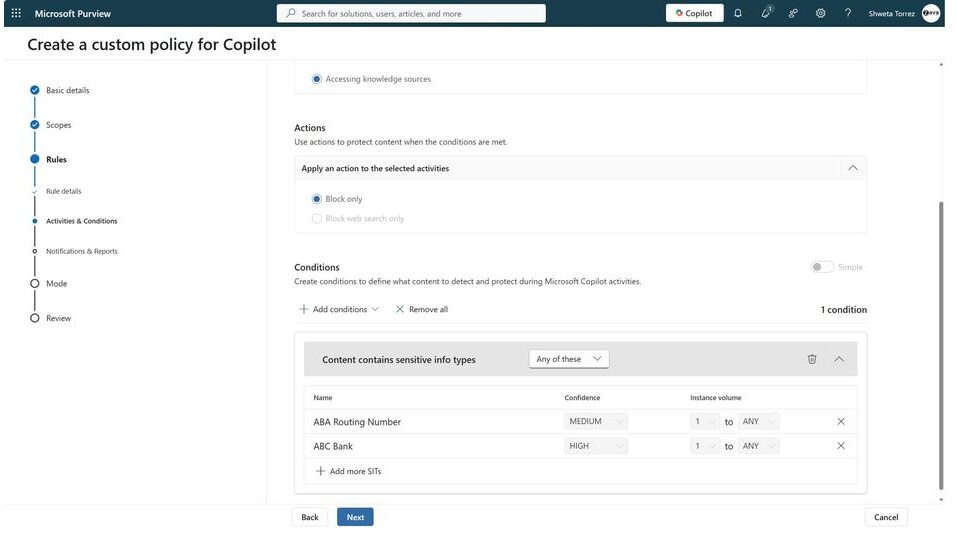
Purview DLP preventing Copilot from grounding responses in sensitive files. Source: Microsoft Purview Ignite announcement.
Classification is getting easier to scale, but that doesn’t make it better by default
Microsoft has also announced several improvements to classification and auto-labelling, including increasing the number of files that can be auto-labelled in SharePoint and OneDrive from 100,000 to 500,000 per tenant per day. Simulation capacity is increasing from 4 million to 20 million matching items, and there are improvements to sensitive information types, classifier management and targeting SharePoint sites.
These are useful changes, particularly for larger organisations that have struggled with the time it takes to classify existing information. Being able to process more content without spending quite so much time waiting for jobs to finish is welcome.
One announcement I find particularly interesting is recurring classification refresh, planned for public preview in January 2027. This will allow previously scanned information to be classified again when detection capabilities are updated or improved, without waiting for someone to open or modify the files.
Considering how much old content organisations have sitting in SharePoint and OneDrive, this makes sense. There are probably documents in some tenants that haven’t been touched since SharePoint 2013 was considered a modern platform, yet they’re still available to anyone with the right permissions. Being able to reassess that information as classification improves is a sensible addition.
Microsoft is also extending default sensitivity labels for SharePoint libraries to existing files at rest, and this is where I have a few opinions.
Anyone who has read my previous articles knows I’m not particularly fond of applying a tenant-wide default label to everything. If every document is automatically labelled General, we haven’t learned much about the information. We’ve simply made the classification reports look more complete, which is not quite the same thing.
A default label on a specific SharePoint library is different. If the library has a clear purpose and every document in it genuinely belongs to the same classification, applying that label can make sense. But it still requires someone to understand what belongs there, how existing labels are handled and whether the resulting protection is appropriate.
Making classification faster is useful. Making incorrect classification faster is somewhat less impressive, even if the dashboard finishes updating before lunch.
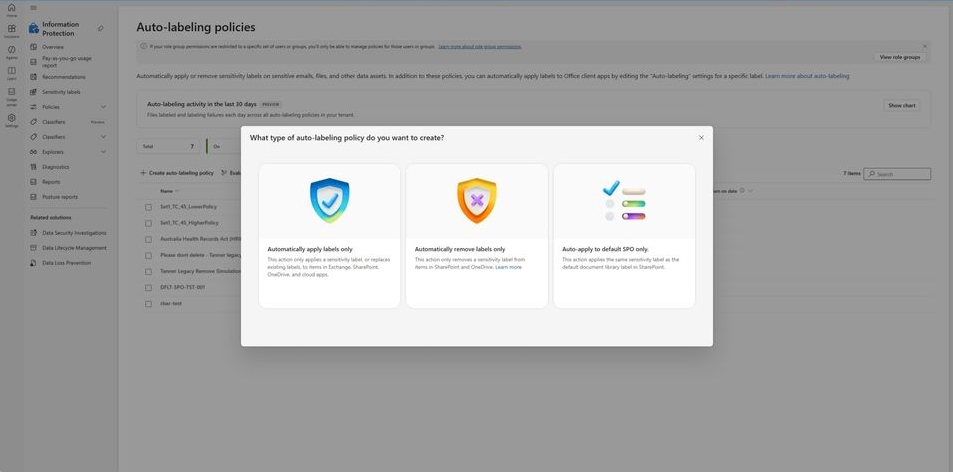
Default sensitivity labels for existing files in SharePoint libraries. Source: Microsoft Purview Ignite announcement.
Shadow AI has moved beyond the browser
I’m speaking at ESPC in December with a session called Shadow AI: Find It. Control It., so naturally I paid particular attention to the announcements around local AI agents, network DLP and agent activity.
For a while, much of the Shadow AI discussion has focused on people opening ChatGPT, uploading company documents to external services or using whatever AI-powered PDF analyser someone recommended on LinkedIn that morning. Those problems haven’t disappeared, but they’re no longer the whole story.
We’re now dealing with local AI agents, command-line tools, MCP servers and applications that can access files, communicate with other services and perform actions. Some of these tools can operate with relatively little user involvement, which makes understanding their access and behaviour rather important.
Microsoft has announced Purview DLP capabilities for local AI agents on Windows, with public preview planned for January 2027. These controls are intended to provide visibility into sensitive information used through agent prompts, files and tools, with policies that can be scoped to particular agents.
This raises several questions I want to investigate. How much of an agent’s activity can we see? Can we identify which files it accessed and what information it attempted to process? What happens when an agent invokes another tool, and where exactly does DLP enforcement take place?
Microsoft has also announced network DLP through Entra Global Secure Access, providing another way to protect sensitive information being sent to unsanctioned AI applications. This adds another control alongside Defender for Cloud Apps and Endpoint DLP, although it doesn’t mean we can simply replace one with another.
Different controls cover different scenarios, and the details matter. Endpoint DLP can help control certain actions on managed devices, Defender for Cloud Apps helps us discover and manage cloud application usage, and network-level enforcement can address traffic through supported network paths. None of these should be treated as universal protection for every application, device and agent.
For organisations that have built their entire Shadow AI strategy around blocking a few websites, the next few years may be educational.
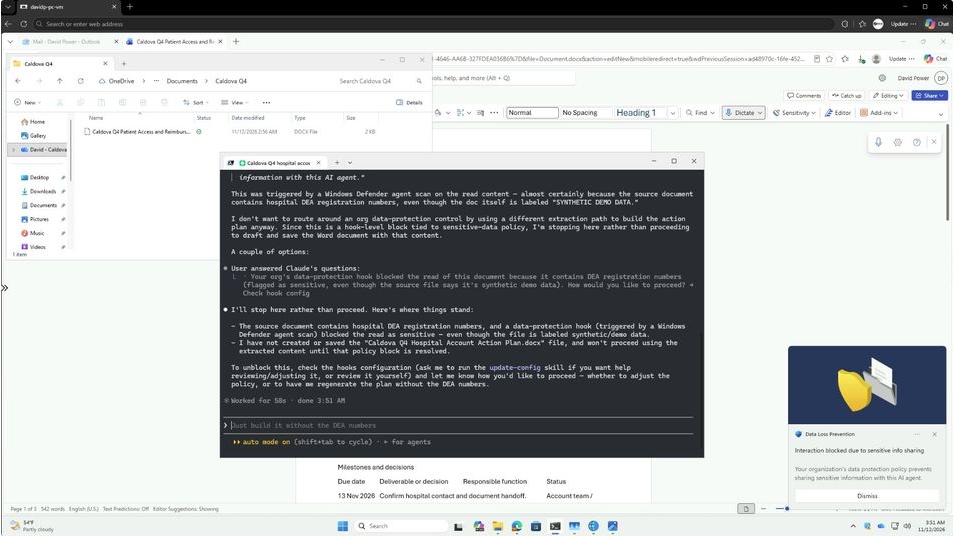
Purview DLP blocking sensitive information accessed by a local AI agent. Source: Microsoft Purview Ignite announcement.
Copilot is getting more freedom to do things
Microsoft has announced several changes to the Copilot experience, including Copilot Home, Cowork and Autopilot. Home brings Chat and Cowork into a more integrated experience, while Cowork allows users to delegate more complex tasks rather than handle everything through individual prompts.
Autopilot goes further by introducing a persistent agent with its own identity, memory and tools. It is designed to perform supported tasks, monitor activity and coordinate work without waiting for someone to write another prompt every time. Microsoft is beginning to roll it out through Frontier.
From a productivity perspective, I can understand the appeal. There are plenty of repetitive tasks that people would happily delegate, and having an agent handle some of that work could be useful.
From an information governance perspective, however, the questions become more complicated.
When Copilot retrieves information and provides an answer, we need to understand what it can access and whether the user should have access to that information in the first place. When an agent starts performing actions, we also need to understand what it can change, which systems it can interact with and whether it should be allowed to act without approval.
An agent that can create a document is one thing. An agent that can modify existing information, send messages, update business systems or trigger workflows is another. The difference isn’t necessarily in how intelligent the agent is, but in what we’ve allowed it to do.
Microsoft is building identity, management and auditing capabilities into these experiences, including dedicated agent identities and scoped access. Those are necessary controls, but they don’t remove the need for organisations to make decisions about permissions, approvals and responsibility.
Giving an agent its own identity is useful. Giving it access to everything because configuring permissions properly seemed like too much work is still a terrible idea.
This also changes how we should approach Copilot adoption. Teaching users how to write prompts and use Copilot in Office applications is no longer enough. We need to help people understand delegation, review results and recognise when an agent should ask for approval rather than simply getting on with the job.
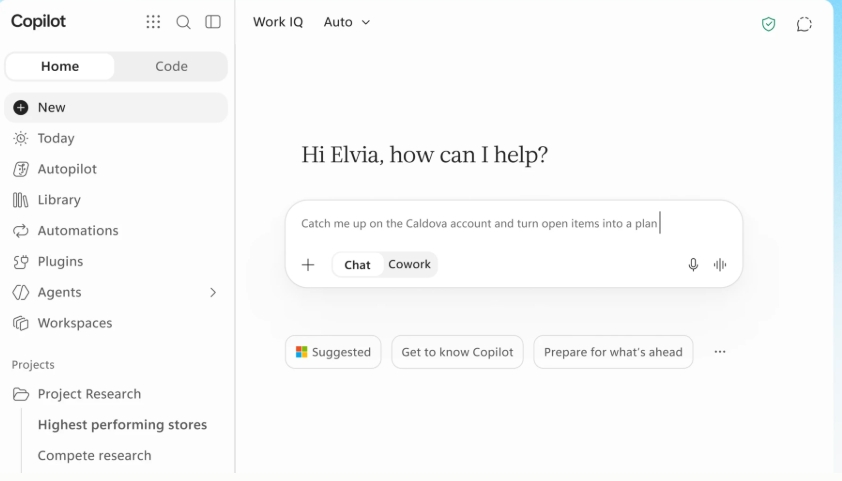
Copilot Home and Cowork interface from the official Copilot Ignite announcement.
Agent 365 and the problem of nobody knowing who owns anything
Another area worth paying attention to is Agent 365, where Microsoft is expanding capabilities for discovering, managing and monitoring agents across an organisation.
The announcements include broader visibility into local and third-party agents, MCP activity, ownership, lifecycle management and risk. Microsoft is also developing Dynamic Agent Risk, which brings together signals from identity, data, endpoints, network and runtime activity to help assess changes in an agent’s risk.
I can see why this is necessary, because I suspect quite a few organisations are going to discover that they have more agents than they thought, and that nobody is entirely sure who owns them.
We’ve already seen this with SharePoint sites, Teams, applications and various forms of automation. Someone creates something useful, people start depending on it, the original owner changes roles, and a few years later nobody dares to touch it because they’re not sure what will break.
Now we have the opportunity to repeat the exercise with agents that can access information and perform actions. How lovely.
The technical capabilities in Agent 365 should help organisations understand what’s running and how those agents behave, but visibility alone doesn’t solve ownership or governance. Before an agent is deployed, someone should be responsible for its purpose, permissions, data sources, tools and lifecycle.
We also need to know what happens when its behaviour changes, when its owner leaves or when the business process it supports is no longer needed. An agent shouldn’t remain active indefinitely simply because nobody remembers creating it.
The same principles we’ve applied to application governance and identity management still apply here. We just need to take them seriously before the number of agents becomes unmanageable.
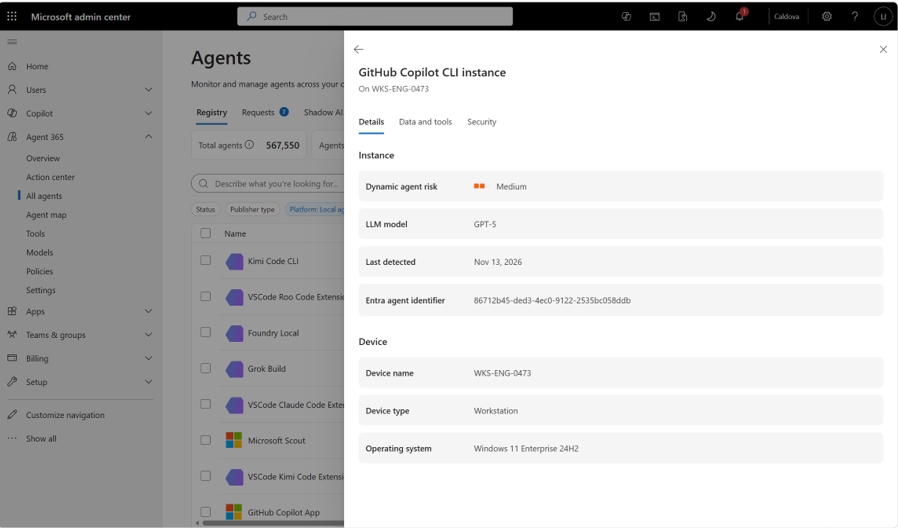
Agent 365 inventory and shadow agent discovery from the official Agent 365 announcement.
Identity and information protection still need each other
Microsoft is also expanding Entra capabilities for agent identities, Conditional Access and risk-based access decisions. This connects closely to something I’ve spoken about before, particularly when discussing Zero Trust and the relationship between identity and information protection.
An organisation can have excellent Conditional Access policies, but if users have excessive access to sensitive information, successful authentication doesn’t solve that problem. Equally, having carefully configured sensitivity labels won’t compensate for permissions that nobody has reviewed in years.
Agents make that relationship more important because they need identities, permissions and access to business systems just like other applications and workloads. The difference is that they may perform a large number of actions without someone supervising each one.
Microsoft is extending Entra Agent ID and introducing additional controls intended to help organisations manage those identities and respond to changes in risk. I’m particularly interested in how access decisions can be influenced by agent behaviour and signals from other security products.
An agent being trusted when it starts a task doesn’t necessarily mean everything it does afterwards should remain trusted. If its behaviour changes, its access may need to change as well.
This is where identity, information protection and agent governance need to work together. Treating them as separate projects may be convenient for the organisational chart, but it’s not particularly helpful when an agent is accessing sensitive information through several connected services.
Work IQ won’t fix your SharePoint mess
Microsoft is continuing to develop Work IQ and the broader Microsoft IQ architecture, with the aim of giving Copilot and agents better organisational context. This includes information from Microsoft 365, business systems and connected sources, helping AI understand relationships between people, documents and processes.
That could improve how Copilot and agents work with business information, but it also makes information architecture more important.
I’ve written about SharePoint governance, metadata and lifecycle management before, partly because so many organisations still have enormous amounts of outdated content sitting around. There are abandoned sites, duplicate documents, unclear ownership and permissions that have accumulated over years of projects, reorganisations and well-intentioned collaboration.
Giving AI better ways to find and use that information doesn’t automatically make the information correct.
If an agent retrieves an outdated procedure because nobody archived it, the problem isn’t necessarily the agent. If it uses a document that everyone can access because nobody reviewed the permissions, the problem existed long before Copilot arrived.
Better organisational context is useful, but it depends on the quality and governance of the information being used. SharePoint governance, metadata, permissions and lifecycle management are still part of Copilot readiness, whether we find them exciting or not.
Personally, I find them some what interesting. I appreciate that this may not be a universally shared opinion.
And eventually someone will ask what all this costs
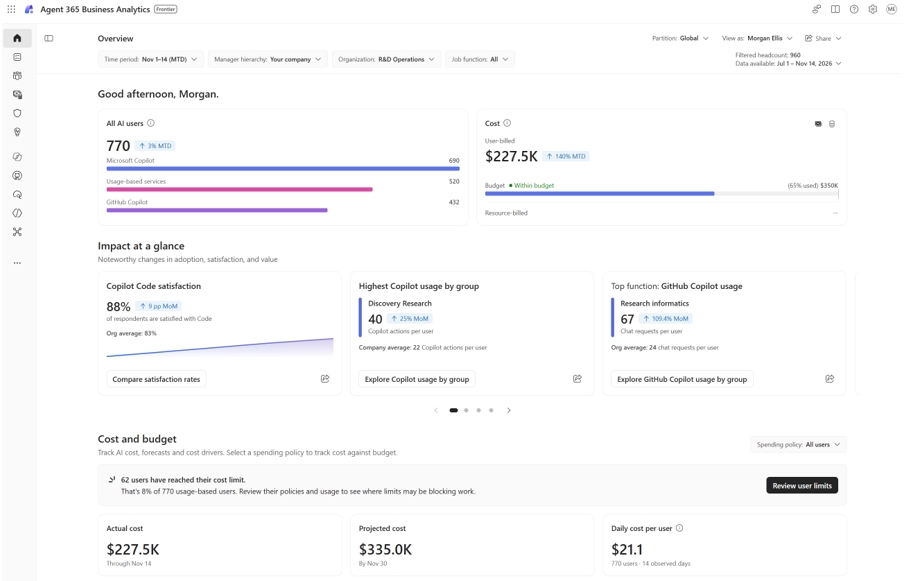
Microsoft has also announced Agent 365 cost management and business analytics capabilities, which should help organisations understand AI consumption, spending and outcomes.
This is becoming more relevant as organisations move beyond fixed Copilot licences and start introducing agents that consume services, invoke tools and use different models. The costs aren’t always obvious, particularly when an agent performs multiple steps across several systems.
Having better visibility into consumption is useful, but I think it’s equally important to understand what the organisation gets in return.
An agent that performs hundreds of tasks isn’t necessarily valuable if those tasks weren’t needed, or if someone has to spend hours checking and correcting the results. Equally, an agent that saves a few minutes of work but costs considerably more than the work itself may need a closer look.
The number of agents deployed isn’t a particularly useful measure of success. Neither is the number of prompts processed or tokens consumed.
Organisations need to understand what work is being completed, how reliable the results are and whether the cost makes sense.
I’m sure finance departments will eventually develop an interest in this. Probably around the time the invoices arrive.
What I’m taking away from Ignite
For me, the most important announcements from Ignite 2026 are the Purview DLP improvements, the classification changes and the new controls for agents. These address problems organisations are already dealing with, particularly as Copilot gains access to more information and agents are given more opportunities to act on our behalf.
I’m pleased to see Microsoft extending protection beyond sensitivity labels and traditional browser-based scenarios. Content-based DLP for Copilot, local agent controls and network-level enforcement are all areas worth investigating, although we need to be clear about what is available today and what is still in preview.
Several of the Purview capabilities I’ve discussed are planned for January 2027, while other features are generally available or being introduced through Frontier. An announcement at Ignite doesn’t mean a feature is ready to deploy across every production tenant next Monday, regardless of how convincing the demonstration looked.
For organisations working with Copilot today, I would start by reviewing the controls already in place. Understand what sensitive information Copilot can access, test existing DLP policies, review SharePoint permissions and find out which AI applications and agents are already being used.
For organisations planning to introduce more autonomous agents, I would add ownership, identity, permissions, approved tools and clear boundaries around what those agents are allowed to do. None of these are new governance principles, but they become rather important when software starts performing tasks without someone approving every action.
I like the direction Microsoft is taking with several of these announcements, and I’m looking forward to testing the new Purview capabilities when they’re available. But more controls also mean more things to configure, understand and maintain, and I don’t think we’re going to run out of work any time soon.
I’ve said it before, and I’ll probably keep saying it until people get tired of hearing it.
Stop admiring your policies. Test them.
And before you give an agent permission to do something, make sure you understand exactly what that permission allows.
It’s usually preferable to finding out afterwards.
References
- Microsoft Ignite 2026 Book of News
- Microsoft Purview: Secure the data that fuels AI
- Microsoft Agent 365 announcements
- Microsoft Copilot announcements
- Microsoft Entra announcements
Author

Discover more from Agder in the cloud
Subscribe to get the latest posts sent to your email.
 Sandra Saluti